Don't be scared off!
This document contains everything that you need to know about the project and what your task will be. As such, it is very detailed. Don't let that scare you off. It may sound confusing, but it's very simple to understand once you start doing it.
Background
There are two ways to search in the census – by name and by address/location. Searching by name is the easier way to go, but it is not always possible. For one thing, the name might have been so poorly written that it was transcribed incorrectly when the name index was created. For another, there might not be a name index. In the case of the 1940 census, there probably will be no name index available on opening day – April 2, 2012 (although groups will undoubtedly begin producing such an index after the census opens).
That means the only way that the 1940 census can be searched initially is by address or location. Unfortunately the census is organized by by something called an Enumeration District (ED). If you don’t know the ED, you cannot easily access the census. So we need some aid for converting addresses/locations to EDs.
That’s what this project is all about. We will be providing a
web-based utility that allows people go from an address to an ED for
all cities of 15,000 or more in the 1940 census. Right now, we have all
cities over 25,000 indexed, and many more under that figure.
One-Step Census ED Utilities
If you go to the One-Step website and look in the US Census section, you’ll see a tool called 1900-1940 Census ED Finder. This tool allows you to enter an address, and it will tell you which 1900, 1910, 1930, or 1940 ED that address is located in. The current project is to add more 1940 cities to that tool.
Notice that the above ED Finder tool does not tell you which 1920 ED your address is in. For 1920 we provide a separate tool called 1920-1930-1940 ED Finder/Converter. That tool converts 1930 EDs to their 1920 equivalents (and vice versa). It will also do the same between 1930 and 1940.
We also have up a searchable file for all 1940 census definitions less
cities of over 50,000 called 1880-1940 ED Definitions
So for 1940 we will be providing an ED Definition Finder, an ED Finder and an ED
Finder/Converter.
The 1940 ED Finder will be useful for large cities whereas the other two utilities
will be useful for small urban communities and rural areas. This project calling for volunteers involves the 1940 ED Finder only.
Materials
The National Archives and Records Administration (NARA) has microfilms containing ED descriptions for the 1940 census. Joel Weintraub has been using his digital camera to photograph those microfilms and make the resulting jpeg images available to you. So you won’t need to look at microfilm but rather at jpeg images. You can work with the image directly on your computer screen, or if you are more comfortable with hard copy you can print out the image.
If the images are difficult to read because the original was of poor quality, do the best you can. We expect that NARA will put online these images in 2011, so that will be another source for these descriptions. Once those images are online, we will ask for volunteers to use them to proof the transcriptions of cities over 50,000 (200 of them) that we did a few years ago.
And getting the images couldn't be simpler. We've developed a
download
tool that allows you to easily download all the images for your
city
onto your computer. Once you've run this tool, your browser will
display a page containing all the jpeg images for your city. You
should then do a "Save As" (under the file menu) and save it away as a
"complete html web page". That way you can reload it in the
future
directly from your computer and you will not need to keep refetching it
from the server. The download tool
starts off with some test values filled in. Joel will give you
the
actual values for your city when he assigns a city to you. Note: When
NARA puts these images online, it will be even simpler to access them.
Your Task
You will be working with ED descriptions and maps that appear on the images. These resources should show all the streets within each ED. Your job is simply to transcribe these streets. And we will provide you with a data-entry tool to make that transcription easier. That tool can be found here.
But before you can begin transcribing, you need to understand the
format of the ED descriptions.
Format of ED Descriptions
Let's look at the general format of a very large city typical ED description. The top line shows the state and the county. It sometimes shows a Supervisor's District (SD) as well, but you won’t be needing that. The first column on the page shows the 1930 ED (you won’t be needing that either) and the next column shows the 1940 ED. This number you will need.
Notice that an ED is composed of a pair of numbers separated by a dash, such as 64-7. We’ll refer to the portion before the dash as the ED prefix (64 in this case) and the portion after the dash as the ED suffix (7 in this case). In 1930 the prefixes were assigned to counties, and all cities within that county had the same prefix. In 1940 some of the larger cities were assigned their own prefixes.
In 1940, if an ED turned out to be too much for a single enumerator (census taker) to handle, it was divided up and given to several enumerators. A letter was added at the end of the ED when this occurred. For example, if ED 64-7 turned out to be too big, it was subdivided into ED 64-7A, 64-7B, etc.
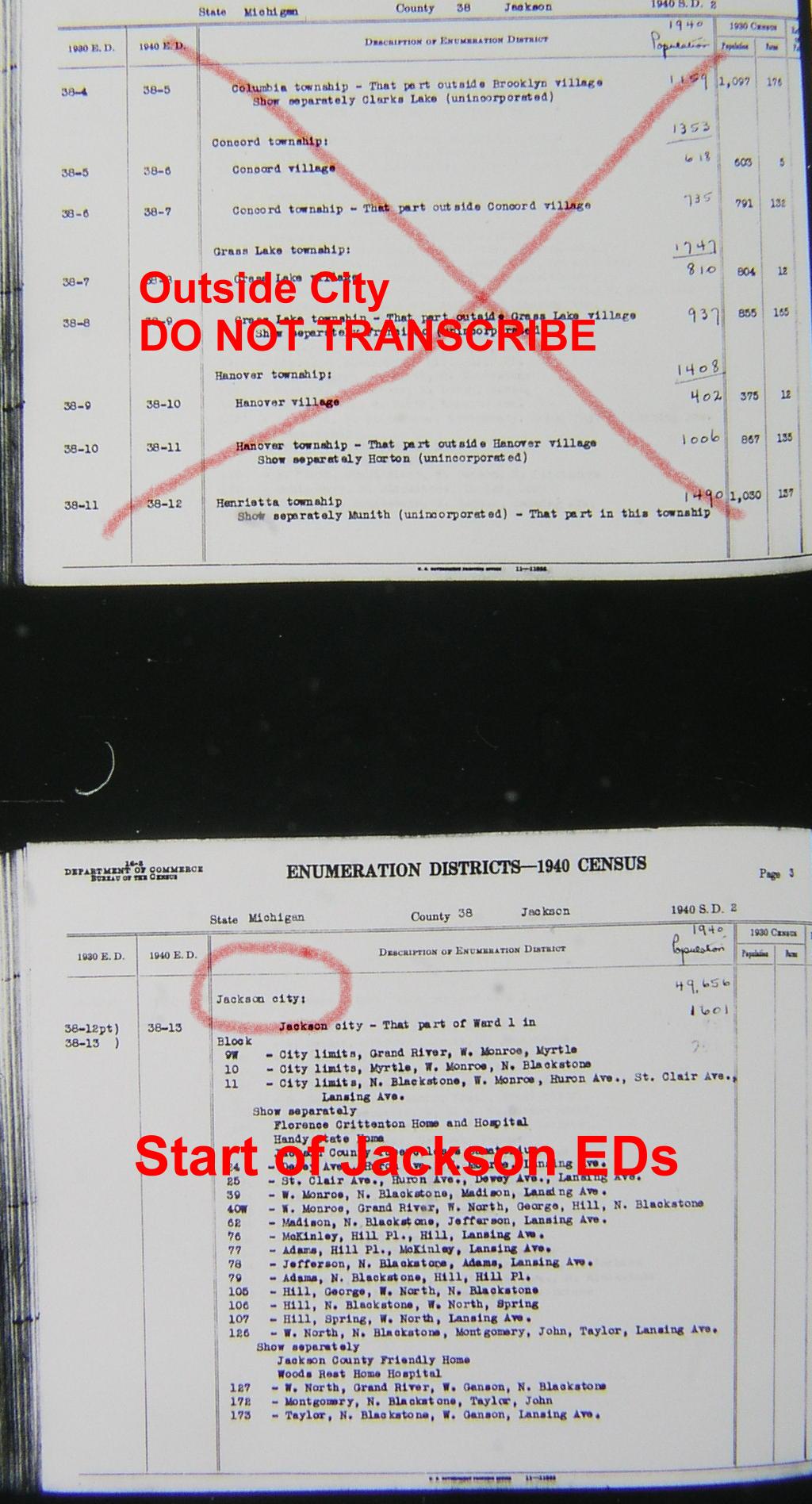
One thing to watch out for -- be careful to determine where your city's descriptions begin and end on your sequence of images. The first few ED descriptions on the set of images for your city might be descriptions of the final EDs for the preceding city. You can usually tell that since the text in the column directly to the right of the 1940 ED number would indicate the start of a new city. Similarly the last few ED descriptions might be for the initial EDs of the next city. You should simply ignore these extraneous ED descriptions in your transcriptions. See this example of a set of images starting with EDs for a previous city.
Note that for these large city descriptions, all street names and institutional
names are present within the ED scan. Since we completed cities over 50,000, we
transcribed all ED definitions of all areas less than 50,000, and that's on the
One Step website, so you can get that information online, and not from the definition
scans. The ED definitions for smaller urban areas do not look like the block by block
definition example we just gave. Let's look at the general format of a city with under
50,000 in population,
Ardmore, OK
ED example. Note that only boundary streets are shown, and if present,
institutions. In order to fill in the internal street names, you are going to
have to use ED maps of the city as well as the online ED definition utility, and
record on the entry forms the street names you see within the ED you are working on.
Joel has such ED maps, of varying quality, and will
show you examples for each for your picked cities. Not all maps are of such quality
that you will be easily able to read the internal street names from each ED, and
other resources may be needed to accomplish the task.
Transcribing the Data
We have already transcribed all cities having 25,000 or more people in 1940, and now intend to add many cities below that value. For states that don't have a city above 25,000, we have transcribed the largest cities in that state so as not to leave that state unrepresented.
You are now ready to use the data-entry tool and transcribe each street in each ED for the city that was assigned to you. But before you jump into it, let’s look at some typical situations that you might face, and what to transcribe in those cases.
1. ED Boundaries that are not StreetsWe may add other rules as we go along (or as we remember them), but you will be all right if you are just consistent in the way you transcribe information.You might see an entry that is not a street name but has been included because it defines the boundary of the ED. One example is XXX Railroad (R.R.). Since the RR might now be under a different name, or the tracks even paved over, it might not be of much value to put the RR's specific name in your database. In addition, a researcher probably wouldn't enter a railroad name as one of the streets when he is using the One Step ED Finder. What to do? I would enter in this case: Railroad tracks. Be consistent within your city -- don't enter Railroad tracks (lower-case t) in one case and Railroad Tracks (upper case T) in another, otherwise BOTH terms will appear in the list of street names on the One Step site. If the boundary is a river or creek, by all means put that down. Even if the researcher doesn't search on that name, they still will be able to see that geographical feature within our list of names for each ED.
2. Political Boundaries
You might see (and I hope not) a political boundary shown such as Ward line. Since those boundaries change, they have little use for our researchers in the year 2012. It's up to you whether you want to include that or not. I would include it just for historical purposes. You might see Corporation line, City line, xyz city line, etc. Be consistent and just use City limits or City line to describe the variations you find for the edge of the city.
3. Unknown
You might see "unknown street" in the description. In that case it’s all right to transcribe it as "unknown". Or it might be impossible to read a street name from the film. There too you can transcribe it as "unknown", or you might want to consult a modern map to try to figure out the name of the street.
4. Modifiers
Let's discuss street name modifiers and what to do with them. A modifier can be a compass direction (North Jackson, East Jackson) or a street designation (Main Street, Main Avenue, Main Boulevard, Main Road).
Note that the ED descriptions on your images do NOT use the term "Street".... so that Perry Street shows on the image as just Perry. We follow that convention and do NOT put St after a "Street" name. There are exceptions. If you have a street that is named East Street, West Street, North Street, South Street, or even New Street, Old Street, Railroad Street, .... it would be helpful here to enter East St, West St, etc. so that it's clear you haven't made an error and separated a compass modifier from a street name.
We suggest standard abbreviations for Alley (Al), Avenue (Av), Boulevard (Blvd), Court (Ct), Highway (Hwy), Lane (La), Parkway (Pkwy), Place (Pl), Road (Rd), etc. But more important than using our suggested abbreviations is being CONSISTENT. If you enter "Main Ave" in some places, and "Main Av" in others, then BOTH names will appear on the street name list on the One Step Site. And do not put a period after the abbreviation.
We decided that streets with the same name but different modifiers should appear together in the street name list on the One Step site. In order to do that, we placed any compass modifier AFTER rather than before the street name. So North 5th Avenue and South 5th Avenue should be entered as 5th Av N and 5th Av S. Note that the compass modifier has been abbreviated to a single letter (with no period) and comes after the street name and street modifier (Av, Pl, etc.).
You may encounter situations where the compass modifier is really part of the street name, rather than showing a section of the street. For example, perhaps a city surrounds a lake and you have independent streets named West Lake Avenue and East Lake Avenue. It would be awkward to transcribe these as Lake Av W and Lake Av E. In this situation you'll probably feel strongly that the compass modifier should be first. So transcribe it that way, but also include the name with the modifier at the end. Remember, our goal is to be useful, not to be exact in terms of street names. So if you have a street name where you could put down two different variations of the name (West Lake Ave, Lake Ave W, or Main Ave and Old Main Ave), then put both names down. However, if you do this, make sure that EVERY occurrence of this street shows BOTH names in every ED that it is found in.
See also item 10 below for a discussion on variations in street names.
5. Numbered Streets
Some cities have streets like Fourth Avene, Fifth Avenue, Sixth Avenue, etc. Transcribe these as 4th Av, 5th Av, and 6th Av. This will result in their being adjacent in the (alphabetized) street dropdown list of the resulting ED Finder, making it easier for the researchers to find such streets.
6. Lettered Streets
Some cities have streets like Avenue A, Avenue B, etc. Transcribe these just that way -- don't abreviate to Av A, Av B.
7. Periods
Never include periods in your transcription. For example, if you need to enter St. Albans Street, enter it as "St Albans".
8. Institutions
If there is an institution (hospital, jail, orphanage) shown within an ED, by all means add that to your list. Treat the name as if it was a street name. Some institutions are given their own ED number.
9. Single Apartment Complex
A single apartment complex might be given its own ED number. This creates a potential problem as the apartment physically resides in the same area as the broader ED surrounding it. Let's say we have an ED which consists entirely of an apartment complex at 233 West Jackson Boulevard. Enter the street name as: "Jackson Blvd W #233 Apts". If you enter it this way, then researchers looking up Jackson Blvd W will see not only that entry but on a nearby line they will see "Jackson Blvd W #233 Apts". Thus if they know the address it should "jump" out at them from the list and they might be able to get the ED number. (See also item 12.)
But don't be fooled by the wording "show separately" on the ED descriptions. This does not imply an apartment complex with a separate ED. Rather it means that the enumerator was to enumerate the apartment on a separate census census sheet.
10. Variations in Street Names
There are many errors on the ED descriptions and you may find that a street is not shown consistenly. Sometimes the same street is shown with different spellings, sometimes with a compass modifier and sometimes without, or sometimes as an "Avenue" and sometimes as a "Street." Our guideline has been to reduce variations whenever possible.
Spelling variations are usually easy to spot and you can use your judgement on those. Variations in street modifiers are usually harder to deal with. A look at a map (even a contemporary map if a 1940 map is not available) might resolve the problems of name variations. Your own knowledge of the city could be used in place of a map.
We worked through many of these variations for the 1930 street list, so another way of checking for consistency is to go to the 1930 ED Finder which shows street names within cities for 1930. Your city should be there and you can check to see if a street name appears in more than one form (Ave and/or St).
Of course this does not mean that you need to go to all this trouble to check every variation. Use your judgement and just check the ones that you are unsure of. It's not an exact science, and in many cases they are just judgement calls. We will be proofreading your work and will do additional checking as well.
11. Subdivided EDs with Boundary Definitions
For some cities (e.g., St. Louis, El Paso, Denver), the descriptions for the subdivided EDs (i.e., EDs ending in a letter) use a boundary description instead of a block-by-block description. So whereas the description of the original ED shows every street within the ED, the description of the subdivided EDs show only the boundary streets. See this St. Louis example. Fortunately such ED descriptions are in the minority -- most of the subdivided EDs do give block-by-block descriptions.
So now we have the problem of figuring out all the streets within each subdivided ED when the description gives only the boundary streets. This can be solved by looking at a map and figuring out the area bounded by each subdivided ED. Then use the map along with the block descriptions of the original ED to figure out the internal streets within each subdivided ED. Ideally you would want to use a map as close to 1940 as possible, but in most cases you could get by with a contempoary map, such as one from one of the online mapping services. Of course if you are familiar with the city and know the particular neighborhood that has been subdivided, you might not even need the map.
If you run into such subdivided EDs with boundary-street definitions and cannot resolve them, let Joel know and he will generate the list of internal streets for you.
12. Excluding
Insitutions and large apartment complexes frequently have an ED unto themselves. Yet the street on which the institution or complex resides is in another ED. The description of that other ED might say something like "Union Av excluding Municipal Jail". The Municipal Jail will be taken care of when you transcribe its ED. So for the other ED simply transcribe "Union Av" and make no mention of any exclusions.
Now... take a look at the data
entry utility we have put together. And make sure to press
the
HELP button to get instructions for how to use that utility. That
utility will not only make it easier for you to transcribe your data,
but
it will also make it easier for us to process your data once you submit
it to us.
Backing Up Your Work
The data-entry tool provides you with the ability to save your work on our server. But this puts the saved data out of your control and there is always the risk of data loss. Therefore I recommend that you try entering some test values, saving them, and making sure that you can retrieve them. Once you are sure that is working, you can then enter and save your real values.
To do such tests, you will want to use a different volunteer name, otherwise you will over-write any real values that you might have previously saved. I suggest that your testing name be your real name with the word "testing" added (e.g. SteveMorseTesting) so that we can recognize those test values when we see them on the server and not think they are real values.
I should mention that the data-entry tool has some safeguards to prevent you from losing your data. First, whenever you do a save, you are asked to confirm that you really want to save. That prevents you from losing previously-saved values if for some reason the values you currently have on your screen are all bogus.
Second, whenever you attempt to leave the data-entry tool (either by loading in another webpage or by closing the browser window completely) and you have unsaved values, you will get a message asking if you want to do a save. That prevents you from forgetting to save values that you really meant to save.
Finally, here' a way of providing a backup facility. When you
do a save, you are presented with a screen showing what data has been
saved.
The data is not in the same format that you entered it, but you will be
able to recognize your values in that data. Copy and paste the
contents
of that screen into a text file and keep that on your computer.
If
at some later time you discover that your file on the server has been
destroyed,
I (Steve) can re-create your server file for you if you send me the
latest
text file you saved on your computer.
If you've read all this and haven't become discouraged yet, then
it's
time to join the project. You do so by going to our city-request
form and picking the cities you would like to work on. We
will
be notified automatically when you do so and we will assign you a city
as soon as possible.
-- Steve Morse, Joel Weintraub, Dave Kehs